File
Here's To
The Crazy Ones
The Misfits
The Rebels
The Troublemakers
Edit
The Ones
Who See
Things
Differently
View
They're
Not Fond
Of Rules
Special
Stay
Hungry
Stay
Foolish
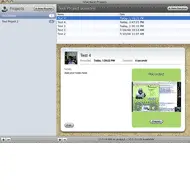
Silverback launches to provide UX pros with Macintoshes a simple, inexpensive tool for recording usability test sessions, so you won't have to ever touch another Windows box if you don't want to. (I'm kidding. I'm sure you will at some point in your life.)
Silverback provides most of the functionality you need for discount usability. People wanting a full featured tool like Morae won't find their solution here, but if all you want is to organize test sessions, capture audio/video of screen interactions and participants face and voice, then Silverback might be for you.
The process is pretty simple.
This application is a bit like using the screen capture tool ScreenFlow, but provides a few nice functionalities that make sense for usability testing. I admit to not doing a lot of time on task reporting in Morae, since my focus has mostly been on qualitative research, but that's one thing you might miss. I also like the post-test surveys built into Morae, but you can easily create a SurveyMonkey survey or something and have the user fill that out.
The other thing that you won't find are simple video editing tools so you can cut pieces out for your highlight reel when presenting your findings--if you do that sort of thing. You can easily do that in QuickTime though and stitch together your clips.
I think this tool has the right functionality you'd need to do discount testing on the Mac right now. All of the features you need to go the extra mile to make clips presentable are pretty much at your disposal if you have QuickTime Pro or iMovie. For me as a discount usability tester, the best part of this is, I won't have to worry about needing a separate PC to do simple testing. If you bundle this with screensharing tools like those built into iChat or using VNC, you have the makings of a decent Mac UX toolkit.
Purchase price is only $49.95 and Clearleft are donating 10% of all profits to The Dian Fossey Gorilla Fund. That's two reasons too feel good about making this purchase.


