File
Here's To
The Crazy Ones
The Misfits
The Rebels
The Troublemakers
Edit
The Ones
Who See
Things
Differently
View
They're
Not Fond
Of Rules
Special
Stay
Hungry
Stay
Foolish
One of the things I've always found a chore, being a producer of graphic documents, is versioning and organizing the docs for a team. I've had to use different tools like Source Safe, Sharepoint, Basecamp, and just shared drives to this. One nice thing I like about working with our Traction server is that it does Webdav for document management and file versioning. That's one of the projects I'm working on a preview release of to make the web-based interface a bit more friendly.
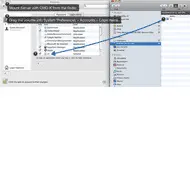
The thing with Webdav is that I can mount the shared folders in my Mac Finder and drag and drop tons of documents in there without going to the web site. But I don't want to have to manually connect to the shared folder. Luckily it's easy to have the Mac OS automatically connect to servers when you log in. Someone tweeted today wondering how you do that, so I posted a screenshot showing how I've set up my Mac. You can do the same thing with whatever share point or server you use.
Here's the steps:
That's it. Now your Mac should automatically try to connect to your server volume whenever you log in, and it will show up in your Finder.


